

Why the Model Context Protocol (MCP) is the Language Server Protocol (LSP) of the AI Era
Why building custom AI connectors is dead—and how MCP gives coding assistants direct, secure access to your stack.
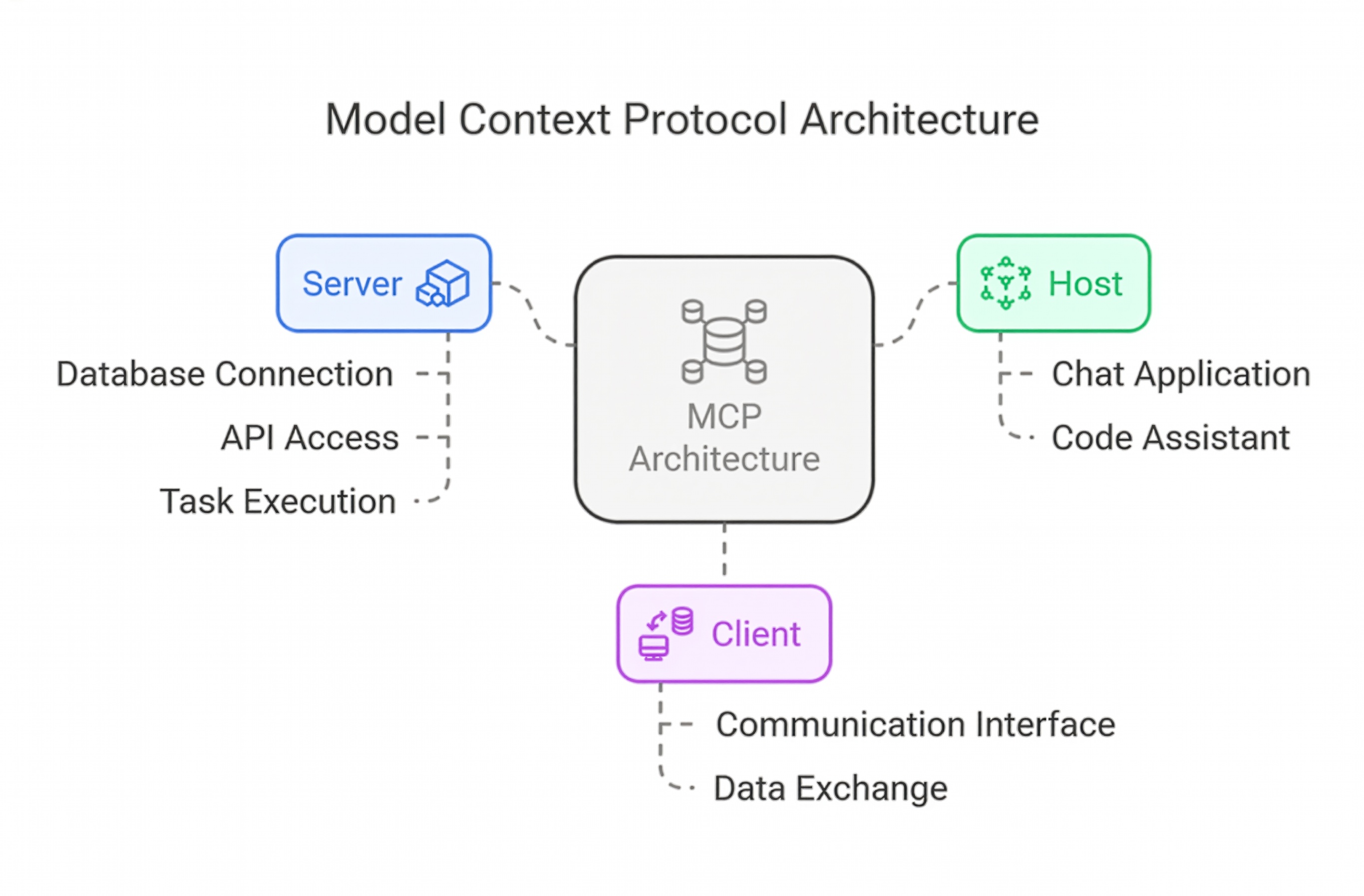
If you spend any time in developer tools today, you've probably watched AI evolve from a basic web chat box into something that actually reads your local files, pokes around git branches, and runs queries against your database.
Right in the middle of this is an open standard from Anthropic called MCP (Model Context Protocol).
The name sounds like academic jargon, but the idea is dead simple. Software engineers actually ran into this exact same architectural headache ten years ago—and fixed it using something called the Language Server Protocol (LSP).
Here is what problem MCP actually solves, why it matters, and how it works under the hood.
1. The \(M \times N\) Nightmare We Solved in 2016
To get why MCP is a big deal, look at how code editors used to handle plugins.
Back in the day, if you had four editors (VS Code, Sublime Text, Neovim, and Emacs) and four programming languages (Python, Go, TypeScript, Rust), the math was brutal:
$$4 \text{ Editors} \times 4 \text{ Languages} = 16 \text{ Unique Plugins}$$
Every single editor team had to write custom autocomplete, syntax highlighting, and definition finders for every single language. If a new language appeared tomorrow, every editor community had to rebuild the wheel.
Microsoft fixed this mess with LSP (Language Server Protocol).
Instead of writing $16$ custom plugins, they created one shared standard:
The language compiler runs in the background as a "Server."
The editor acts as the "Client."
Both exchange standard JSON-RPC messages over standard input/output.
Suddenly, \(M \times N\) custom plugins dropped to \(M + N\) adapters. Build one language server, and every editor on Earth can use it immediately.
2. History Repeats: The AI Tooling Bottleneck
Over the last two years, AI developer tools hit the exact same wall:
The Clients: Claude Desktop, Cursor, Windsurf, terminal agents.
The Tools: Local filesystems, GitHub, PostgreSQL, Linear, Jira.
Until recently, every single tool vendor built bespoke integrations. If someone wrote a brilliant PostgreSQL inspector for Cursor, you couldn't touch it inside Claude Desktop without rewriting the whole thing from scratch.
It was brittle, full of glue code, and frankly unsustainable.
MCP stops that cycle. It is, point for point, the LSP of the AI era.
3. Side-by-Side: LSP vs. MCP
The design of MCP takes direct inspiration from LSP. Both keep client and server strictly decoupled and communicate via standard JSON-RPC.
| Feature | Language Server Protocol (LSP) | Model Context Protocol (MCP) |
|---|---|---|
| Primary Client | Code Editors (VS Code, Neovim) | AI Hosts (Claude Desktop, Cursor, Agents) |
| What It Asks For | "Find definition", "Show errors" | "Read this file", "Query this DB", "Run this test" |
| Protocol | JSON-RPC 2.0 | JSON-RPC 2.0 |
| Transport | Local processes via stdio |
Local stdio or remote HTTP/SSE |
| Core Advantage | Build one server, support all editors | Build one server, support all AI hosts |
4. The Three Superpowers of an MCP Server
When you fire up an MCP server, you hand your AI client three distinct capabilities:
Resources (Read-Only Data): Think of this like opening a file. The server surfaces application logs, database schemas, or documentation so the model has real ground truth instead of guessing.
Tools (Executable Functions): Real actions the model can trigger. This could be running
git status, creating a GitHub issue, or restarting a local dev server.Prompts (Saved Workflows): Reusable prompt templates shipped directly by the server, like a standardized security audit or PR review checklist.
5. What This Looks Like in Practice
Setting up an MCP server doesn't require a mountain of boilerplate.
You write a lightweight script (using Python or TypeScript) that exposes the functions you want your assistant to use. Then you register it inside your AI client's config file (like claude_desktop_config.json):
{
  "mcpServers": {
    "dev-helper": {
      "command": "python",
      "args": ["/absolute/path/to/server.py"]
    }
  }
}
When your AI app boots up:
It spawns your script as a child process and handshakes over standard input/output (stdio).
It queries your server to discover available tools and resources.
When you ask "Check my git branch and tell me what changed," the model parses your intent, calls your local function behind the scenes, and answers with real data.
No browser extensions. No copy-pasting terminal output.
6. Why MCP Actually Matters
1. Real Privacy on Local Machines
Because standard MCP servers run locally via stdio, your local credentials and proprietary codebase never touch third-party cloud servers. The AI only sees the specific output your tools return.
2. No Vendor Lock-In
If your team writes an internal MCP server to query your microservices, that tool isn't chained to one model provider. Switch from Claude to Cursor, or from closed models to a local open-source setup, and your MCP server works without changing a line of code.
3. From Chatbots to Useful Workflows
Prompting an AI inside a browser tab has clear limits. Real productivity starts when models have structured, controlled access to run checks, read logs, and manipulate environments safely.
7. Wrapping Up
Software moves forward when we agree on boring, predictable protocols.
LSP quietly solved editor fragmentation a decade ago. Now, MCP is doing the exact same thing for AI toolchains. If you build internal scripts, APIs, or developer tooling, writing an MCP server is the cleanest way to make sure your work is ready for whatever AI client comes next.
